我的书签
 添加书签
 移除书签
核心用法(1/3)
Connect Claude to a local, Cloud, or existing CDP browser with Browser Use and the Anthropic Python SDK.
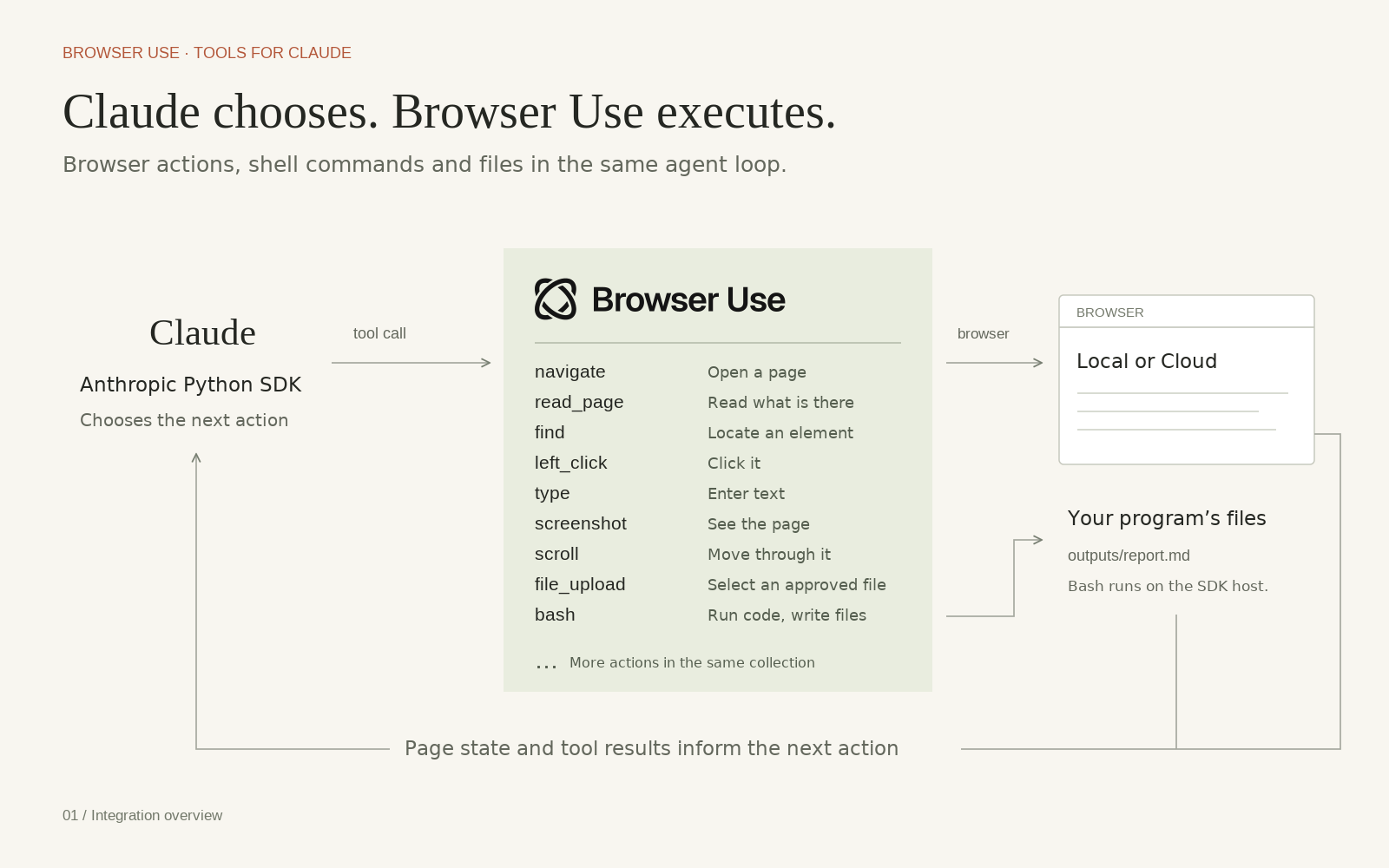
Browser Use toolsets for Claude is maintained by Browser Use and is compatible with Claude. It provides browser actions and a Bash tool through the Anthropic Python SDK. The SDK's tool runner sends each of Claude's tool calls to Browser Use, returns the result to Claude, and repeats until Claude finishes.
<img alt="Claude sends tool calls through the Anthropic SDK tool runner to the Browser Use integration, which provides browser actions and Bash. Results return to Claude. The browser runs locally or remotely. Bash runs on the SDK host." />
Installation
This integration requires a Browser Use version containing browser_use.integrations.toolsets_for_claude and an Anthropic SDK version containing anthropic.tools.browser and client.beta.messages.tool_runner. If either import is unavailable, your installed package version does not support this example. Check Anthropic's browser-toolset release instructions for SDK availability.
You need Python 3.11 or newer on Linux or macOS with /bin/bash. On Windows, run the example inside WSL.
uv init --python 3.12
uv add browser-use anthropic
uvx browser-use install
uvx browser-use install installs local Chromium. You can skip it if you only use Browser Use Cloud.
Set your Anthropic API key:
export ANTHROPIC_API_KEY=your-key
Quickstart
This example reads three Hacker News posts and saves their titles and URLs as Markdown and JSON in outputs/. It enables all 31 browser actions plus Bash, without approval prompts.
Save the following as run_browser.py:
"""Build a Hacker News reading list with Browser Use and Claude.

Requires Linux/macOS with /bin/bash, or WSL on Windows.
"""

import asyncio
from pathlib import Path

from anthropic import AsyncAnthropic
from anthropic.tools.browser import LocalFilePolicy  # pyright: ignore[reportMissingImports]

from browser_use.integrations.toolsets_for_claude import Bash, BrowserUse

TASK = 'Read the first three Hacker News posts and save their titles and URLs to hacker-news.md and hacker-news.json.'

SYSTEM_PROMPT = 'Complete the task with the browser tools and Bash.'

async def main() -> None:
    driver = BrowserUse(
        # use_cloud=True,  # Uncomment and set BROWSER_USE_API_KEY to use Cloud.
        # These tools are disabled by default.
        configs={
            'javascript_exec': {'enabled': True},
            'file_upload': {'enabled': True},
            'read_console': {'enabled': True},
            'read_network': {'enabled': True},
        },
        confirm=lambda _: True,  # Run without approval prompts.
        file_policy=LocalFilePolicy(upload_roots=[Path('uploads'), Path('outputs')]),
    )
    bash = Bash(output_dir=Path('outputs'))

    async with driver, AsyncAnthropic() as client:
        runner = client.beta.messages.tool_runner(
            model='claude-opus-5-5',
            max_tokens=32_768,
            max_iterations=100,
            tools=[driver, bash],
            system=SYSTEM_PROMPT,
            messages=[{'role': 'user', 'content': TASK}],
        )
        final = await runner.until_done()
        print('\n'.join(block.text for block in final.content if block.type == 'text'))

if __name__ == '__main__':
    asyncio.run(main())
Run it:
uv run run_browser.py
The script prints Claude's final answer with the three titles and the saved filenames. Set ANTHROPIC_LOG=info to include SDK request logs.
The system prompt is part of your application. Adapt it to your task.
Choose a browser
To run the browser in Browser Use Cloud, create a key at Browser Use Cloud, set BROWSER_USE_API_KEY, and uncomment use_cloud=True in the quickstart’s BrowserUse(...) call. Keep its configs and confirm arguments. For remote uploads, replace the local file_policy with the staged-document policy and resolver in Uploads to a remote browser. Local Chromium is not needed in this mode. Bash still runs on the SDK host.
BrowserUse supports three browser configurations:
| Browser | Configuration | Lifecycle |
|---|---|---|
| Local Chromium | BrowserUse() |
Owned: the driver starts and closes it |
| Browser Use Cloud | BrowserUse(use_cloud=True) |
Owned: the driver creates and stops it |
| Existing CDP browser | BrowserUse(session) |
Borrowed: your application manages it |
To use a browser you already started, pass a connected BrowserSession. The driver does not close a borrowed session, so close it in your application's cleanup block. See remote browser connections for CDP configuration.
Browser tools
The Browser Use integration provides BrowserUse for browser actions and Bash for shell commands. Register both with tools=[driver, bash]. Leave out bash if your application should not run shell commands.
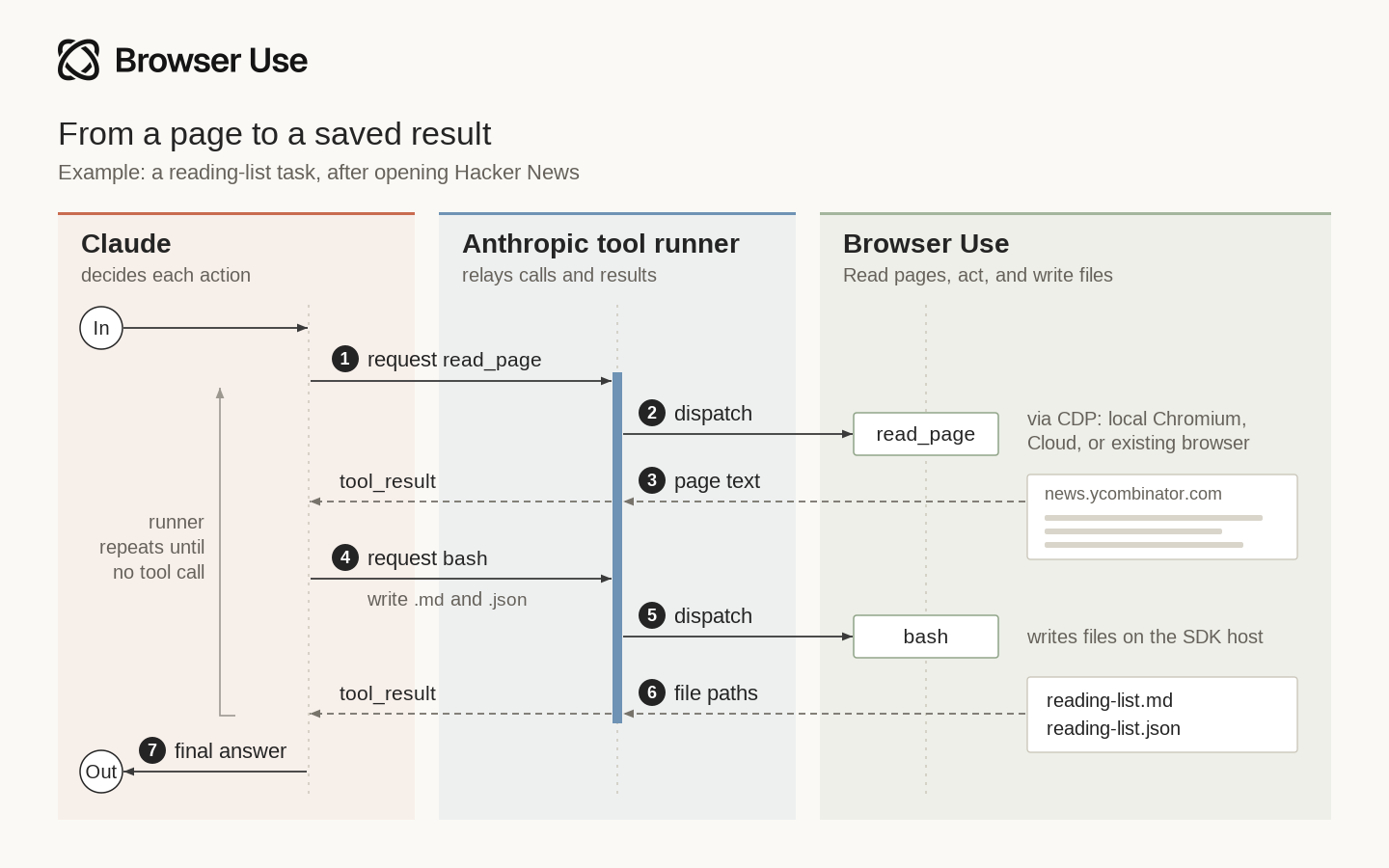
Claude calls structured actions such as navigate, read_page, and left_click, and the driver runs them over CDP. javascript_exec runs JavaScript inside the page; it is not a general-purpose CDP code interpreter. Bash runs beside your Python process with output_dir as its working directory, where it can process extracted data and write reports.
<img alt="Sequence after opening Hacker News. Claude calls read_page, the tool runner passes it to Browser Use, and the page contents return to Claude. Claude then calls bash, which writes the Markdown and JSON files on the SDK host, and the result returns to Claude." />
- Navigation:
navigate,new_tab,list_tabs,switch_tab,close_tab. - Page state:
screenshot,zoom,read_page,find,get_page_text,wait. - Pointer:
left_click,right_click,middle_click,double_click,triple_click,hover,mouse_move,left_mouse_down,left_mouse_up,left_click_drag,scroll,scroll_to. - Input:
type,key,hold_key,form_input,file_upload. - Diagnostics:
read_console,read_network,javascript_exec.
The quickstart enables all 31 browser actions plus Bash. A bare BrowserUse() follows Anthropic's defaults: 27 actions enabled, with javascript_exec, file_upload, read_console, and read_network off. The quickstart turns those four on with configs:
configs={
    'javascript_exec': {'enabled': True},
    'file_upload': {'enabled': True},
    'read_console': {'enabled': True},
    'read_network': {'enabled': True},
}
Your application supplies the tools to Claude through tools=[driver, bash]. The SDK sends the browser toolset and its configs to Anthropic, and Claude chooses calls from the enabled actions. Disabled actions are withheld from Claude and rejected by the SDK if requested. Registering driver alone does not include Bash. javascript_exec runs JavaScript inside the page; Bash runs commands on the SDK host.
To opt out, set an action's enabled value to False in the configs passed to BrowserUse(...). To remove Bash, use tools=[driver] and update the task and system prompt so they do not request shell commands.
File uploads and downloads
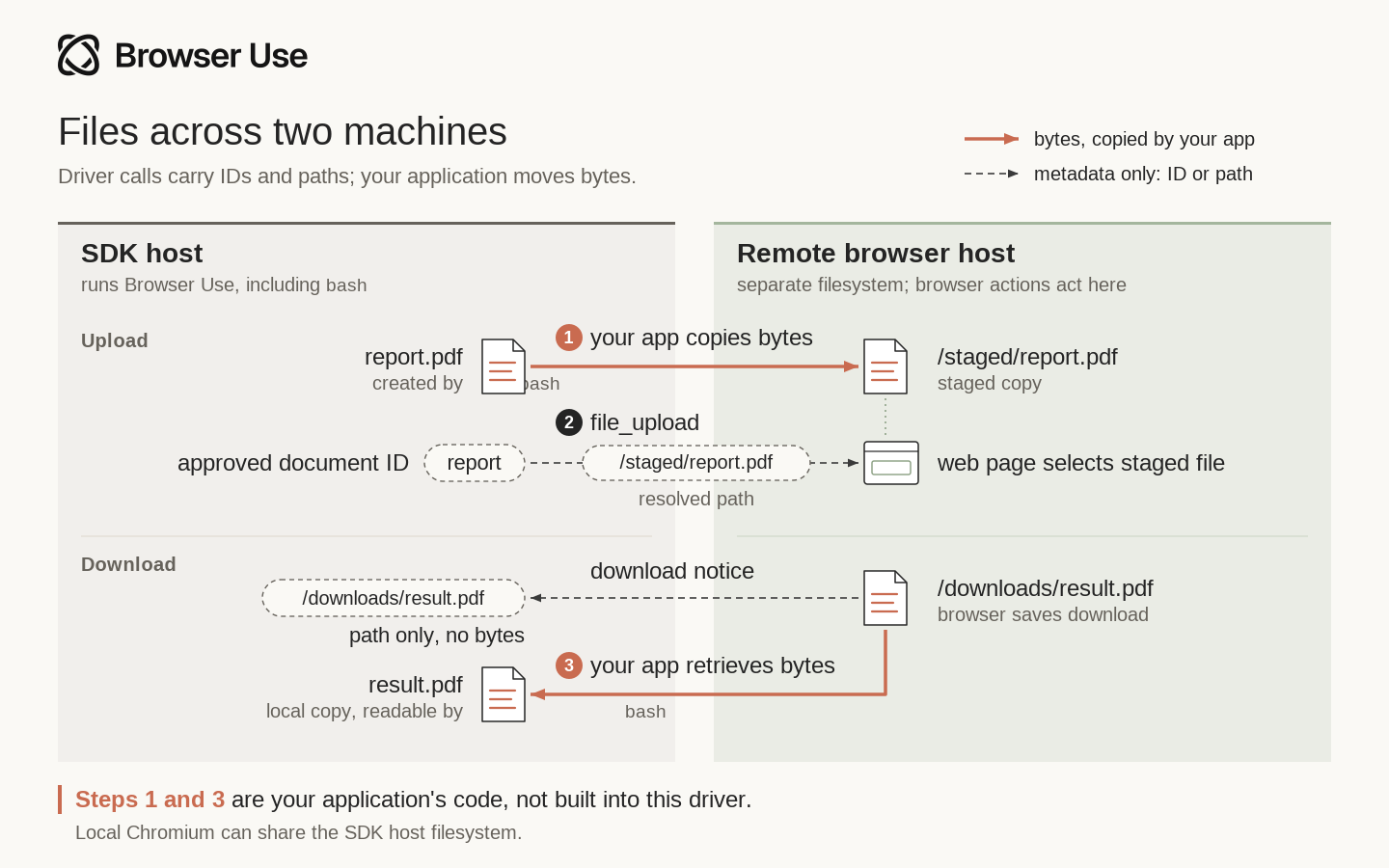
File paths in browser actions refer to the browser host. With local Chromium, that is the same machine as your Python process: an approved local file can be uploaded, and downloaded bytes can be read locally. A remote browser has its own filesystem.
<img alt="A report starts on the SDK host. The application copies bytes to the remote browser host before file_upload can select the staged file. Download notifications return metadata; the application must retrieve the bytes before Bash can read a local copy. These transfers are not built into the driver." />
Uploads to a remote browser
For a remote upload, your application must first copy the file's bytes to the browser host. Then it can give Claude an approved document ID and map that ID to the staged path. file_upload selects the staged file in the page's file input.
The transfer step is separate from the driver. The code below begins after report.pdf is already on the browser host:
from anthropic.tools.browser import LocalFilePolicy
from browser_use.integrations.toolsets_for_claude import BrowserUse

# session is an already connected remote BrowserSession.
# The file must already exist on that browser's machine.
remote_paths = {'report': '/staged/report.pdf'}

driver = BrowserUse(
    session,
    configs={'file_upload': {'enabled': True}},
    confirm=lambda _: True,
    file_policy=LocalFilePolicy(upload_document_ids=remote_paths.keys()),
    document_resolver=lambda document_id: remote_paths[document_id],
)
The resolver maps IDs to paths and does not copy bytes. BrowserUse(use_cloud=True) does not provide automatic upload staging or download retrieval. The open-source Agent has the same browser-host path requirement for uploads.
Downloads from a remote browser
A download notification reports that the browser finished a download. The reported path is metadata about the browser host and does not mean the file exists on the SDK host. Retrieve the file to the SDK host before asking Bash to read it.
The quickstart needs no transfer, because Bash writes the Markdown and JSON directly on the SDK host.
Approvals
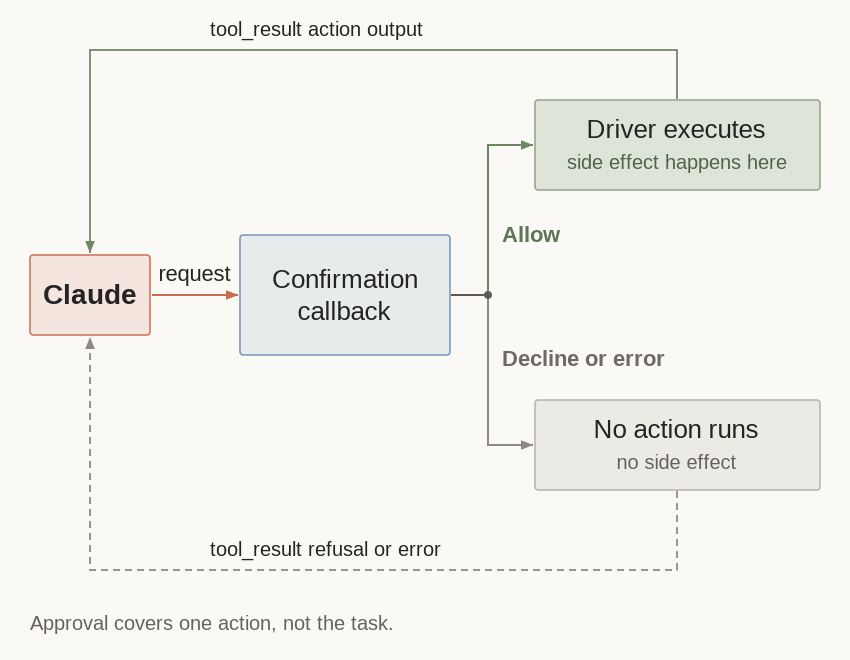
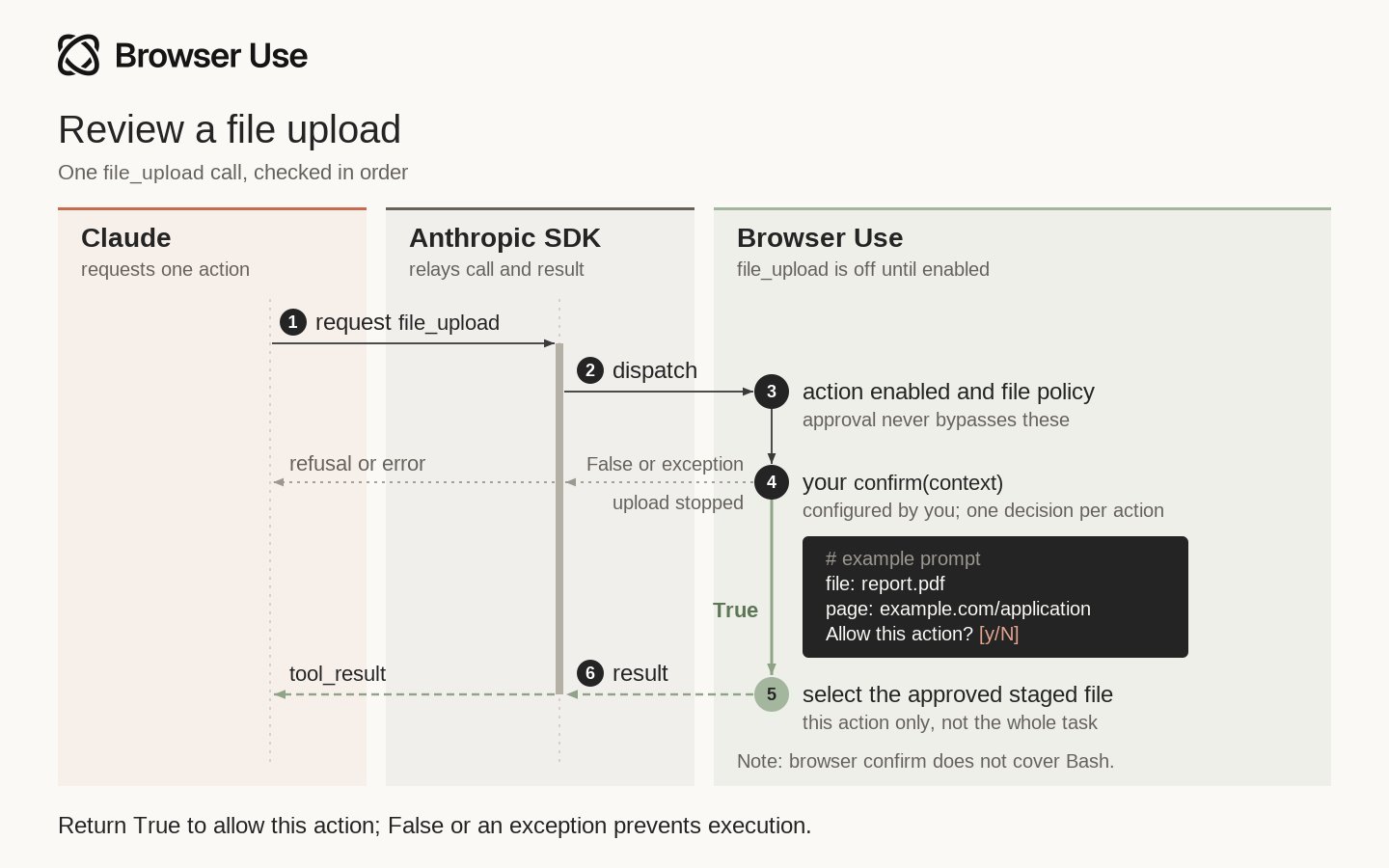
Enabling file_upload or javascript_exec requires a confirmation callback. The SDK calls it before executing a browser action, after checking that the action is enabled and its inputs and file selection are allowed.
The quickstart uses confirm=lambda _: True to approve browser actions automatically. Replace it with the callback below to ask for approval when Claude uploads a file or runs page JavaScript. It approves other browser actions automatically. The callback can use a terminal prompt, a review screen in your app, or your own approval service.
<img alt="Claude requests an action. The confirmation callback either allows the driver to execute it or declines it. A callback error also prevents execution. The action output, refusal, or error returns to Claude; approval covers one action." />
Open full-size diagram · See the file-upload sequence
import asyncio
from pathlib import Path

from anthropic.tools.browser import ConfirmContext, LocalFilePolicy
from browser_use.integrations.toolsets_for_claude import BrowserUse

async def confirm(context: ConfirmContext) -> bool:
    if context.member not in {'file_upload', 'javascript_exec'}:
        return True
    details = context.input.model_dump_json(exclude_none=True)
    answer = await asyncio.to_thread(
        input,
        f"Action: {context.member}\nPage: {context.tab_url}\n{details}\nAllow this action? [y/N] ",
    )
    return answer.strip().lower() == 'y'

driver = BrowserUse(
    configs={
        'file_upload': {'enabled': True},
        'javascript_exec': {'enabled': True},
    },
    confirm=confirm,
    file_policy=LocalFilePolicy(upload_roots=[Path('uploads'), Path('outputs')]),
)
For example, an upload request could show this prompt (the paths and page below are illustrative):
Action: file_upload
Page: https://example.com/application
{"target":{"type":"ref","ref":"ref_7"},"paths":["/your-project/uploads/report.pdf"]}
Allow this action? [y/N]
| Callback outcome | What happens |
|---|---|
User enters y or Y |
Returns True; the driver executes this action. |
| User presses Enter or enters another answer | Returns False; the action does not execute. |
| The prompt or approval service raises an exception | The action does not execute; the SDK reports an error. |
Approval applies to this action only. Later calls pass through the callback again. The file allowlist restricts local uploads to uploads/ and outputs/, so files written by Bash can also be approved for upload. Remote browsers require staging on the browser host, as described in Uploads to a remote browser.
This callback prompts for upload and JavaScript and approves all other browser actions. Add checks for actions with side effects, such as sending a message, submitting a purchase, or deleting a record.
Browser confirmation does not cover Bash. Omit Bash or apply a separate execution policy if shell commands need approval. Bash limits execution time and returned output, and removes ambient credentials from its child environment. Its working directory is not an operating-system sandbox, so run untrusted tasks in an isolated environment.
Read the Claude browser-toolset quickstarts for the upstream SDK contract.
Advanced example showing Playwright and Browser-Use working together
Key Features
- Browser-Use and Playwright sharing the same Chrome instance via CDP
- Take actions with Playwright and continue with Browser-Use actions
- Let the agent call Playwright functions like screenshot or click on selectors for deterministic steps
Installation
uv pip install playwright aiohttp
Full Example
import asyncio
import os
import subprocess
import sys
import tempfile

from pydantic import BaseModel, Field

# Check for required dependencies first - before other imports
try:
    import aiohttp  # type: ignore
    from playwright.async_api import Browser, Page, async_playwright  # type: ignore
except ImportError as e:
    print(f'❌ Missing dependencies for this example: {e}')
    print('This example requires: playwright aiohttp')
    print('Install with: uv add playwright aiohttp')
    print('Also run: playwright install chromium')
    sys.exit(1)

from browser_use import Agent, BrowserSession, ChatOpenAI, Tools
from browser_use.agent.views import ActionResult

# Global Playwright browser instance - shared between custom actions
playwright_browser: Browser | None = None
playwright_page: Page | None = None

# Custom action parameter models
class PlaywrightFillFormAction(BaseModel):
    """Parameters for Playwright form filling action."""

    customer_name: str = Field(..., description='Customer name to fill')
    phone_number: str = Field(..., description='Phone number to fill')
    email: str = Field(..., description='Email address to fill')
    size_option: str = Field(..., description='Size option (small/medium/large)')

class PlaywrightScreenshotAction(BaseModel):
    """Parameters for Playwright screenshot action."""

    filename: str = Field(default='playwright_screenshot.png', description='Filename for screenshot')
    quality: int | None = Field(default=None, description='JPEG quality (1-100), only for .jpg/.jpeg files')

class PlaywrightGetTextAction(BaseModel):
    """Parameters for getting text using Playwright selectors."""

    selector: str = Field(..., description='CSS selector to get text from. Use "title" for page title.')

async def start_chrome_with_debug_port(port: int = 9222):
    """
    Start Chrome with remote debugging enabled.
    Returns the Chrome process.
    """
    # Create temporary directory for Chrome user data
    user_data_dir = tempfile.mkdtemp(prefix='chrome_cdp_')

    # Chrome launch command
    chrome_paths = [
        '/Applications/Google Chrome.app/Contents/MacOS/Google Chrome',  # macOS
        '/usr/bin/google-chrome',  # Linux
        '/usr/bin/chromium-browser',  # Linux Chromium
        'chrome',  # Windows/PATH
        'chromium',  # Generic
    ]

    chrome_exe = None
    for path in chrome_paths:
        if os.path.exists(path) or path in ['chrome', 'chromium']:
            try:
                # Test if executable works
                test_proc = await asyncio.create_subprocess_exec(
                    path, '--version', stdout=subprocess.DEVNULL, stderr=subprocess.DEVNULL
                )
                await test_proc.wait()
                chrome_exe = path
                break
            except Exception:
                continue

    if not chrome_exe:
        raise RuntimeError('❌ Chrome not found. Please install Chrome or Chromium.')

    # Chrome command arguments
    cmd = [
        chrome_exe,
        f'--remote-debugging-port={port}',
        f'--user-data-dir={user_data_dir}',
        '--no-first-run',
        '--no-default-browser-check',
        '--disable-extensions',
        'about:blank',  # Start with blank page
    ]

    # Start Chrome process
    process = await asyncio.create_subprocess_exec(*cmd, stdout=subprocess.DEVNULL, stderr=subprocess.DEVNULL)

    # Wait for Chrome to start and CDP to be ready
    cdp_ready = False
    for _ in range(20):  # 20 second timeout
        try:
            async with aiohttp.ClientSession() as session:
                async with session.get(
                    f'http://localhost:{port}/json/version', timeout=aiohttp.ClientTimeout(total=1)
                ) as response:
                    if response.status == 200:
                        cdp_ready = True
                        break
        except Exception:
            pass
        await asyncio.sleep(1)

    if not cdp_ready:
        process.terminate()
        raise RuntimeError('❌ Chrome failed to start with CDP')

    return process

playwright_instance = None

async def connect_playwright_to_cdp(cdp_url: str):
    """
    Connect Playwright to the same Chrome instance Browser-Use is using.
    This enables custom actions to use Playwright functions.
    """
    global playwright_browser, playwright_page, playwright_instance

    playwright_instance = await async_playwright().start()
    playwright_browser = await playwright_instance.chromium.connect_over_cdp(cdp_url)

    # Get or create a page
    if playwright_browser and playwright_browser.contexts and playwright_browser.contexts[0].pages:
        playwright_page = playwright_browser.contexts[0].pages[0]
    elif playwright_browser:
        context = await playwright_browser.new_context()
        playwright_page = await context.new_page()

# Create custom tools that use Playwright functions
tools = Tools()

@tools.registry.action(
    "Fill out a form using Playwright's precise form filling capabilities. This uses Playwright selectors for reliable form interaction.",
    param_model=PlaywrightFillFormAction,
)
async def playwright_fill_form(params: PlaywrightFillFormAction, browser_session: BrowserSession):
    """
    Custom action that uses Playwright to fill forms with high precision.
    This demonstrates how to create Browser-Use actions that leverage Playwright's capabilities.
    """
    try:
        if not playwright_page:
            return ActionResult(error='Playwright not connected. Run setup first.')

        # Filling form with Playwright's precise selectors

        # Wait for form to be ready and fill basic fields
        await playwright_page.wait_for_selector('input[name="custname"]', timeout=10000)
        await playwright_page.fill('input[name="custname"]', params.customer_name)
        await playwright_page.fill('input[name="custtel"]', params.phone_number)
        await playwright_page.fill('input[name="custemail"]', params.email)

        # Handle size selection - check if it's a select dropdown or radio buttons
        size_select = playwright_page.locator('select[name="size"]')
        size_radio = playwright_page.locator(f'input[name="size"][value="{params.size_option}"]')

        if await size_select.count() > 0:
            # It's a select dropdown
            await playwright_page.select_option('select[name="size"]', params.size_option)
        elif await size_radio.count() > 0:
            # It's radio buttons
            await playwright_page.check(f'input[name="size"][value="{params.size_option}"]')
        else:
            raise ValueError(f'Could not find size input field for value: {params.size_option}')

        # Get form data to verify it was filled
        form_data = {}
        form_data['name'] = await playwright_page.input_value('input[name="custname"]')
        form_data['phone'] = await playwright_page.input_value('input[name="custtel"]')
        form_data['email'] = await playwright_page.input_value('input[name="custemail"]')

        # Get size value based on input type
        if await size_select.count() > 0:
            form_data['size'] = await playwright_page.input_value('select[name="size"]')
        else:
            # For radio buttons, find the checked one
            checked_radio = playwright_page.locator('input[name="size"]:checked')
            if await checked_radio.count() > 0:
                form_data['size'] = await checked_radio.get_attribute('value')
            else:
                form_data['size'] = 'none selected'

        success_msg = f'✅ Form filled successfully with Playwright: {form_data}'

        return ActionResult(
            extracted_content=success_msg, include_in_memory=True, long_term_memory=f'Filled form with: {form_data}'
        )

    except Exception as e:
        error_msg = f'❌ Playwright form filling failed: {str(e)}'
        return ActionResult(error=error_msg)

@tools.registry.action(
    "Take a screenshot using Playwright's screenshot capabilities with high quality and precision.",
    param_model=PlaywrightScreenshotAction,
)
async def playwright_screenshot(params: PlaywrightScreenshotAction, browser_session: BrowserSession):
    """
    Custom action that uses Playwright's advanced screenshot features.
    """
    try:
        if not playwright_page:
            return ActionResult(error='Playwright not connected. Run setup first.')

        # Taking screenshot with Playwright

        # Use Playwright's screenshot with full page capture
        screenshot_kwargs = {'path': params.filename, 'full_page': True}

        # Add quality parameter only for JPEG files
        if params.quality is not None and params.filename.lower().endswith(('.jpg', '.jpeg')):
            screenshot_kwargs['quality'] = params.quality

        await playwright_page.screenshot(**screenshot_kwargs)

        success_msg = f'✅ Screenshot saved as {params.filename} using Playwright'

        return ActionResult(
            extracted_content=success_msg, include_in_memory=True, long_term_memory=f'Screenshot saved: {params.filename}'
        )

    except Exception as e:
        error_msg = f'❌ Playwright screenshot failed: {str(e)}'
        return ActionResult(error=error_msg)

@tools.registry.action(
    "Extract text from elements using Playwright's powerful CSS selectors and XPath support.", param_model=PlaywrightGetTextAction
)
async def playwright_get_text(params: PlaywrightGetTextAction, browser_session: BrowserSession):
    """
    Custom action that uses Playwright's advanced text extraction with CSS selectors and XPath.
    """
    try:
        if not playwright_page:
            return ActionResult(error='Playwright not connected. Run setup first.')

        # Extracting text with Playwright selectors

        # Handle special selectors
        if params.selector.lower() == 'title':
            # Use page.title() for title element
            text_content = await playwright_page.title()
            result_data = {
                'selector': 'title',
                'text_content': text_content,
                'inner_text': text_content,
                'tag_name': 'TITLE',
                'is_visible': True,
            }
        else:
            # Use Playwright's robust element selection and text extraction
            element = playwright_page.locator(params.selector).first

            if await element.count() == 0:
                error_msg = f'❌ No element found with selector: {params.selector}'
                return ActionResult(error=error_msg)

            text_content = await element.text_content()
            inner_text = await element.inner_text()

            # Get additional element info
            tag_name = await element.evaluate('el => el.tagName')
            is_visible = await element.is_visible()

            result_data = {
                'selector': params.selector,
                'text_content': text_content,
                'inner_text': inner_text,
                'tag_name': tag_name,
                'is_visible': is_visible,
            }

        success_msg = f'✅ Extracted text using Playwright: {result_data}'

        return ActionResult(
            extracted_content=str(result_data),
            include_in_memory=True,
            long_term_memory=f'Extracted from {params.selector}: {result_data["text_content"]}',
        )

    except Exception as e:
        error_msg = f'❌ Playwright text extraction failed: {str(e)}'
        return ActionResult(error=error_msg)

async def main():
    """
    Main function demonstrating Browser-Use + Playwright integration with custom actions.
    """
    print('🚀 Advanced Playwright + Browser-Use Integration with Custom Actions')

    chrome_process = None
    try:
        # Step 1: Start Chrome with CDP debugging
        chrome_process = await start_chrome_with_debug_port()
        cdp_url = 'http://localhost:9222'

        # Step 2: Connect Playwright to the same Chrome instance
        await connect_playwright_to_cdp(cdp_url)

        # Step 3: Create Browser-Use session connected to same Chrome
        browser_session = BrowserSession(cdp_url=cdp_url)

        # Step 4: Create AI agent with our custom Playwright-powered tools
        agent = Agent(
            task="""
            Please help me demonstrate the integration between Browser-Use and Playwright:

            1. First, navigate to https://httpbin.org/forms/post
            2. Use the 'playwright_fill_form' action to fill the form with these details:
               - Customer name: "Alice Johnson"
               - Phone: "555-9876"
               - Email: "alice@demo.com"
               - Size: "large"
            3. Take a screenshot using the 'playwright_screenshot' action and save it as "form_demo.png"
            4. Extract the title of the page using 'playwright_get_text' action with selector "title"
            5. Finally, submit the form and tell me what happened

            This demonstrates how Browser-Use AI can orchestrate tasks while using Playwright's precise capabilities for specific operations.
            """,
            llm=ChatOpenAI(model='gpt-4.1-mini'),
            tools=tools,  # Our custom tools with Playwright actions
            browser_session=browser_session,
        )

        print('🎯 Starting AI agent with custom Playwright actions...')

        # Step 5: Run the agent - it will use both Browser-Use actions and our custom Playwright actions
        result = await agent.run()

        # Keep browser open briefly to see results
        print(f'✅ Integration demo completed! Result: {result}')
        await asyncio.sleep(2)  # Brief pause to see results

    except Exception as e:
        print(f'❌ Error: {e}')
        raise

    finally:
        # Clean up resources
        if playwright_browser:
            await playwright_browser.close()

        if playwright_instance:
            await playwright_instance.stop()

        if chrome_process:
            chrome_process.terminate()
            try:
                await asyncio.wait_for(chrome_process.wait(), 5)
            except TimeoutError:
                chrome_process.kill()

        print('✅ Cleanup complete')

if __name__ == '__main__':
    # Run the advanced integration demo
    asyncio.run(main())
Configure model reasoning depth across API V2, V3, and V4.
Browser Use exposes reasoning controls in two forms:
- API V4 uses provider-native values inside
modelParams. - API V3 and V2 use the provider-neutral
thinkingLevelfield withdisabled,low,medium, orhigh.
See Models for the complete V4 model list, recommended model, token pricing, and BYOK routes.
API V4 model parameters
V4 forwards an allow-listed modelParams object to the selected provider. The
field names and accepted values therefore differ by model family.
| Model strings | Path | Accepted values |
|---|---|---|
gpt-6-luna |
reasoning.effort |
none, low, medium, high, xhigh, max |
gpt-6-astra |
reasoning.effort |
low, medium, high, xhigh, max |
gpt-5.5 |
reasoning.effort |
none, low, medium, high, xhigh |
gpt-5.6, gpt-5.6-sol, gpt-5.6-terra, gpt-5.6-luna |
reasoning.effort |
none, low, medium, high, xhigh, max |
claude-opus-4.7, claude-opus-4.8, claude-opus-5, claude-sonnet-5 |
output_config.effort |
low, medium, high, xhigh, max |
| Same Claude models | thinking.type |
adaptive, disabled |
| Same Claude models | thinking.display |
omitted, summarized |
gemini-3-flash, gemini-3.5-flash, gemini-3.6-flash |
thinkingConfig.thinkingLevel |
minimal, low, medium, high |
gemini-3.1-pro |
thinkingConfig.thinkingLevel |
low, medium, high |
glm-5.2, glm-5.3-flash, grok-4.5, grok-4.6,
deepseek-v4-flash-vision, kimi-k3, minimax-m3, and claude-fable-5
do not currently accept V4 modelParams.
Omitting both model and modelParams uses gpt-6-luna with
reasoning.effort: high. For an explicit model, omitting modelParams applies
that model's defaults; gpt-5.6-luna and gpt-6-astra use reasoning.effort: xhigh.
Astra does not accept none or minimal. Send an empty
object ("modelParams": {}) to opt out and use the provider's defaults.
V4 examples
curl -X POST https://api.browser-use.com/api/v4/runs \
  -H "X-Browser-Use-API-Key: $BROWSER_USE_API_KEY" \
  -H "Content-Type: application/json" \
  -d '{
    "task": "Compare three project-management tools",
    "model": "gpt-5.6-luna",
    "modelParams": {"reasoning": {"effort": "high"}}
  }'
curl -X POST https://api.browser-use.com/api/v4/runs \
  -H "X-Browser-Use-API-Key: $BROWSER_USE_API_KEY" \
  -H "Content-Type: application/json" \
  -d '{
    "task": "Compare three project-management tools",
    "model": "claude-opus-5",
    "modelParams": {"output_config": {"effort": "high"}}
  }'
curl -X POST https://api.browser-use.com/api/v4/runs \
  -H "X-Browser-Use-API-Key: $BROWSER_USE_API_KEY" \
  -H "Content-Type: application/json" \
  -d '{
    "task": "Compare three project-management tools",
    "model": "gemini-3.6-flash",
    "modelParams": {"thinkingConfig": {"thinkingLevel": "high"}}
  }'
API V3 support
V3 accepts the normalized REST field thinkingLevel. Legacy aliases are
normalized before validation: bu-mini maps to gemini-3-flash, bu-max
maps to claude-sonnet-5, and bu-ultra maps to claude-opus-4.6.
| Model strings | disabled |
low |
medium |
high |
|---|---|---|---|---|
bu-mini, gemini-3-flash, gemini-3.5-flash |
Yes | Yes | Yes | Yes |
bu-max, bu-ultra, claude-sonnet-4.6, claude-opus-4.6, claude-opus-4.7, claude-sonnet-5, claude-opus-4.8, claude-haiku-4.5 |
Yes | Yes | Yes | Yes |
gpt-5.2, gpt-5.4-mini, gpt-5.5, gpt-5.6-sol, gpt-5.6-terra, gpt-5.6-luna |
Yes | Yes | Yes | Yes |
gpt-5-mini |
— | Yes | Yes | Yes |
gemini-3-pro, gemini-3.1-pro |
— | Yes | — | Yes |
glm-5.2 |
Yes | — | — | Yes |
minimax-m3 |
— | — | — | — |
For a follow-up task sent to an existing V3 session:
- Omit
thinkingLevelto retain the session's current setting. - Send a supported value to update the setting for the next task and later follow-ups.
- Send
"thinkingLevel": nullto clear it and return to provider defaults.
The requested value is validated against the existing session's model, not the request model default.
API V2 support
V2 also accepts the normalized REST field thinkingLevel, but it has two
additional limitations. It cannot configure GLM thinking, and it cannot enable
fixed-budget thinking on older Claude 4/4.5 models because the legacy worker
cannot safely replay their thinking blocks. Those Claude models still accept
disabled.
| Model strings | disabled |
low |
medium |
high |
|---|---|---|---|---|
browser-use-llm, browser-use-2.0, gemini-2.5-flash, gemini-3-flash-preview, gemini-3.5-flash, gemini-flash-latest, gemini-flash-lite-latest |
Yes | Yes | Yes | Yes |
gemini-2.5-pro |
— | Yes | Yes | Yes |
gemini-3-pro-preview, gemini-3.1-pro-preview |
— | Yes | — | Yes |
o3, o4-mini |
— | Yes | Yes | Yes |
gpt-5.5, gpt-5.6-sol, gpt-5.6-terra, gpt-5.6-luna |
Yes | Yes | Yes | Yes |
claude-sonnet-5, claude-opus-4-7, claude-opus-4-8, claude-opus-5 |
Yes | Yes | Yes | Yes |
claude-sonnet-4-20250514, claude-sonnet-4-5-20250929, claude-opus-4-5-20251101 |
Yes | — | — | — |
gpt-4.1, gpt-4.1-mini, glm-5.2, minimax-m3, llama-4-maverick-17b-128e-instruct, claude-3-7-sonnet-20250219 |
— | — | — | — |
V2's existing thinking boolean controls legacy agent behavior. It does not
select a provider reasoning depth and does not replace thinkingLevel.
Provider mappings for V2 and V3
Browser Use validates the normalized V2/V3 value before dispatch, then maps it to the provider's native control.
| Provider/model family | Mapping |
|---|---|
| Gemini 3 Flash | disabled becomes provider level minimal; low, medium, and high map directly. |
| Gemini 3.1 Pro | Supports only provider levels low and high. Legacy Gemini 3 Pro names route here. |
| Gemini 2.5 | Uses thinking budgets of 0, 1,024, 4,096, and 8,192 tokens. Gemini 2.5 Pro cannot use the zero-token budget. |
| Claude 4.6+ and Claude 5 | V3 uses adaptive thinking with the requested effort. V2 sends the effort without replaying thinking blocks. disabled turns thinking off where supported. |
| Earlier supported Claude 4/4.5 | Uses fixed budgets of 1,024, 4,096, and 8,192 tokens. V2 cannot enable these fixed-budget modes. |
| GPT-5.1+ | disabled becomes OpenAI reasoning effort none; the other levels map directly. |
| Earlier GPT-5, o3, and o4 | Supports low, medium, and high, but not disabled. |
| GLM | Exposes only a switch: disabled turns thinking off and high turns it on. V2 does not support the switch. |
BYOK behavior
- V2:
thinkingLeveluses the existing model route. It does not add a per-request BYOK switch. - V3: set
useOwnKey: truefor models that require a provider key. Native and BYOK routes use the same support matrix. - V4: add an Anthropic, OpenAI, or Google key under Settings → API Keys →
Bring Your Own Key. V4 automatically uses a matching key; there is no
request flag.
modelParamsworks the same with Browser Use-managed and customer-managed keys.
V2 and V3 examples
REST JSON uses the camelCase wire field thinkingLevel in both API versions.
curl -X POST https://api.browser-use.com/api/v3/sessions \
  -H "X-Browser-Use-API-Key: $BROWSER_USE_API_KEY" \
  -H "Content-Type: application/json" \
  -d '{
    "task": "Compare three project-management tools",
    "model": "claude-opus-4.7",
    "thinkingLevel": "high"
  }'
curl -X POST https://api.browser-use.com/api/v2/tasks \
  -H "X-Browser-Use-API-Key: $BROWSER_USE_API_KEY" \
  -H "Content-Type: application/json" \
  -d '{
    "task": "Compare three project-management tools",
    "llm": "browser-use-2.0",
    "thinkingLevel": "high"
  }'
Validation errors
Unsupported V2/V3 model-level pairs return HTTP 422. The request field is camelCase, while the validation detail currently names the backend field in snake_case:
Model "gemini-3.1-pro" (provider "google") does not support thinking_level="medium". Supported values: low, high
V4 validates the provider-native path and uses its wire name in the error:
Model "gemini-3.1-pro" does not support modelParams.thinkingConfig.thinkingLevel='minimal'. Supported values: high, low, medium
Compatibility and API references
The normalized V2/V3 field is optional and nullable. New sessions use provider
defaults until a level is supplied. Existing V3 sessions retain their current
setting when the field is omitted; send null to clear it. The current Python
and TypeScript SDKs expose the V2/V3 and V4 reasoning fields in their request
types and client methods.
Generated V4 `modelParams` schema.


Generated V3 `thinkingLevel` schema.


Generated V2 `thinkingLevel` schema.