我的书签
我的书签
 添加书签
添加书签 移除书签
移除书签Debugging
Before we write much more code, we will want to have some debugging tools in ourbelt for when things go wrong. Take a moment to review the reference pagelisting tools and approaches available for debugging Rust-generatedWebAssembly.
Enable Logging for Panics
If our code panics, we want informative error messages to appear in thedeveloper console.
Our wasm-pack-template comes with an optional, enabled-by-default dependencyon the console_error_panic_hook crate that is configured inwasm-game-of-life/src/utils.rs. All we need to do is install the hook in aninitialization function or common code path. We can call it inside theUniverse::new constructor in wasm-game-of-life/src/lib.rs:
2. # #![allow(unused_variables)]
3. #fn main() {
4. pub fn new() -> Universe {
5. utils::set_panic_hook();

7. // ...
8. }
9. #}
Add Logging to our Game of Life
Let's use the console.log function via the web-sys crate to add somelogging about each cell in our Universe::tick function.
First, add web-sys as a dependency and enable its "console" feature inwasm-game-of-life/Cargo.toml:
1. [dependencies.web-sys]
2. version = "0.3"
3. features = [
4. "console",
5. ]
For ergonomics, we'll wrap the console.log function up in a println!-stylemacro:
2. # #![allow(unused_variables)]
3. #fn main() {
4. extern crate web_sys;

6. // A macro to provide `println!(..)`-style syntax for `console.log` logging.
7. macro_rules! log {
8. ( $( $t:tt )* ) => {
9. web_sys::console::log_1(&format!( $( $t )* ).into());
10. }
11. }
12. #}
Now, we can start logging messages to the console by inserting calls to log inRust code. For example, to log each cell's state, live neighbors count, and nextstate, we could modify wasm-game-of-life/src/lib.rs like this:
1. diff --git a/src/lib.rs b/src/lib.rs
2. index f757641..a30e107 100755
3. --- a/src/lib.rs
4. +++ b/src/lib.rs
5. @@ -123,6 +122,14 @@ impl Universe {
6. let cell = self.cells[idx];
7. let live_neighbors = self.live_neighbor_count(row, col);

9. +                log!(
10. +                    "cell[{}, {}] is initially {:?} and has {} live neighbors",
11. +                    row,
12. +                    col,
13. +                    cell,
14. +                    live_neighbors
15. +                );
16. +
17. let next_cell = match (cell, live_neighbors) {
18. // Rule 1: Any live cell with fewer than two live neighbours
19. // dies, as if caused by underpopulation.
20. @@ -140,6 +147,8 @@ impl Universe {
21. (otherwise, _) => otherwise,
22. };

24. +                log!("    it becomes {:?}", next_cell);
25. +
26. next[idx] = next_cell;
27. }
28. }
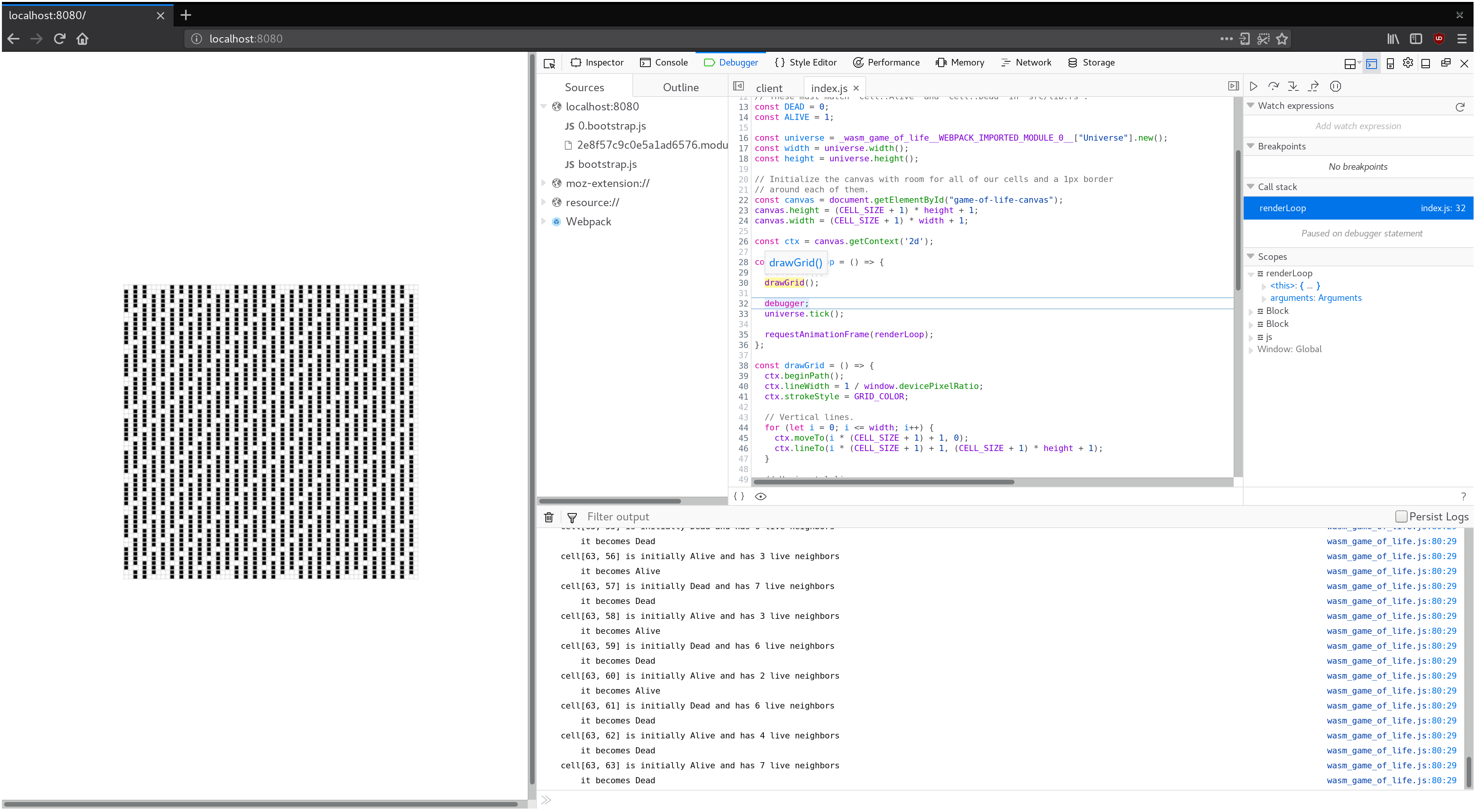
Using a Debugger to Pause Between Each Tick
For example, we can use the debugger to pause on each iteration of ourrenderLoop function by placing a JavaScript debugger; statementabove our call to universe.tick().
1. const renderLoop = () => {
2. debugger;
3. universe.tick();

5. drawGrid();
6. drawCells();

8. requestAnimationFrame(renderLoop);
9. };
This provides us with a convenient checkpoint for inspecting logged messages,and comparing the currently rendered frame to the previous one.
Exercises
- Add logging to the
tickfunction that records the row and column of eachcell that transitioned states from live to dead or vice versa. - Introduce a
panic!()in theUniverse::newmethod. Inspect the panic'sbacktrace in your Web browser's JavaScript debugger. Disable debug symbols,rebuild without theconsole_error_panic_hookoptional dependency, andinspect the stack trace again. Not as useful is it?