
 我的书签
 添加书签
 移除书签
Configure GraphQL client endpoint and HTTP headers
Last updated Apr 23, 2026
1. Launch GraphiQL ↗︎.
2. Select Edit HTTP Headers.  The Edit HTTP Headers window appears.
3. Select Add Header to configure authentication. You can use Cloudflare Analytics API token authentication (recommended) or Cloudflare API key authentication.
- Token authentication:
Enter **Authorization** in the **Header Name** field, and enter `Bearer {your-analytics-token}` in the **Header value** field, then select **Save**.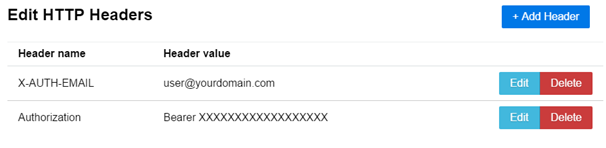
-
Key authentication:
Enter
X-AUTH-EMAILin the Header name field and your email address registered with Cloudflare in the Header value field, and select Save.Select Add Header to add a second header. Enter
X-AUTH-KEYin the Header Name field, and paste your Global API Key in the Header value field, then select Save.
4. Select anywhere outside the Edit HTTP Headers window in GraphiQL to close it and return to the main GraphiQL display. 5. Enterhttps://api.cloudflare.com/client/v4/graphqlin the GraphQL Endpoint field.
Note
The right-side response pane is empty when you enter your information correctly. An error displays when there are problems with your header credentials.
Now that you have configured authentication, you are ready to run queries using GraphiQL.
Was this helpful?
YesNo
On this page
{"@context":"https://schema.org","@type":"TechArticle","@id":"https://developers.cloudflare.com/analytics/graphql-api/getting-started/authentication/graphql-client-headers/#page","headline":"Configure GraphQL client endpoint and HTTP headers","description":"Learn about configure graphql client endpoint and http headers in Cloudflare analytics.","url":"https://developers.cloudflare.com/analytics/graphql-api/getting-started/authentication/graphql-client-headers/","inLanguage":"en","image":"https://developers.cloudflare.com/analytics/graphql-api/getting-started/authentication/graphql-client-headers/og.png?v=c3d2471856d03c00","dateModified":"2026-04-23","publisher":{"@type":"Organization","name":"Cloudflare","description":"One platform for your apps, agents, and workforce. Build, secure, and scale without managing infrastructure","url":"https://www.cloudflare.com/","sameAs":["https://github.com/cloudflare","https://www.linkedin.com/company/cloudflare","https://x.com/cloudflare"],"logo":{"@type":"ImageObject","url":"https://developers.cloudflare.com/logo.svg"},"address":{"@type":"PostalAddress","streetAddress":"101 Townsend St","addressLocality":"San Francisco","addressRegion":"CA","postalCode":"94107","addressCountry":"US"},"contactPoint":[{"@type":"ContactPoint","contactType":"Customer Support","url":"https://support.cloudflare.com/","availableLanguage":["English"]},{"@type":"ContactPoint","contactType":"Sales","url":"https://www.cloudflare.com/contact/","availableLanguage":["English"]}]},"isPartOf":{"@type":"WebSite","@id":"https://developers.cloudflare.com/#website","name":"Cloudflare Docs","url":"https://developers.cloudflare.com/"}}
description: Learn how to use a GraphiQL client to compose and execute a GraphQL query. This guide covers setting up a query, selecting the dataset, and configuring parameters and fields. title: Compose a query in GraphiQL image: https://developers.cloudflare.com/analytics/graphql-api/getting-started/compose-graphql-query/og.png?v=5bec0e950a04fec8
Documentation Index
Fetch the complete documentation index at: https://developers.cloudflare.com/analytics/llms.txt
Use this file to discover all available pages before exploring further.

