
 我的书签
 添加书签
 移除书签
Codex + Cloudflare
OpenAI coding agent available as a terminal CLI and desktop app. It reads and writes files, runs commands, and browses the web in a sandbox.
TerminalStandaloneCloudExtensionOpen Source
Cloudflare Skills· Cloudflare Code Mode API MCP· Cloudflare Domain Specific MCPs· Codex Docs
Quick start
- Install Codex
Install the Codex CLI. macOS and Linux are fully supported; use WSL2 on Windows. For Homebrew or other install methods, see the Codex CLI setup guide ↗︎.
npm install -g @openai/codex
```
2. **Launch Codex in your project**
Start Codex from the root of your project, where `wrangler.jsonc` or `cloudflare.config.ts` lives (if either exists).
```bash
codex
```
3. **Install the Cloudflare plugin**
Inside Codex, run `/plugins`, then search for and install **Cloudflare**. This installs Cloudflare Skills and registers the Cloudflare MCP servers.
```txt
/plugins
```
4. **Try a prompt**
For example:
```txt
Build an image upload and transformation service using R2 and Cloudflare Images.
```
1. **Download Codex**
Follow the download instructions for your operating system at [developers.openai.com/codex/app ↗︎](https://developers.openai.com/codex/app).
2. **Install the Cloudflare plugin**
In the Codex app, go to **Plugins** and install **Cloudflare**.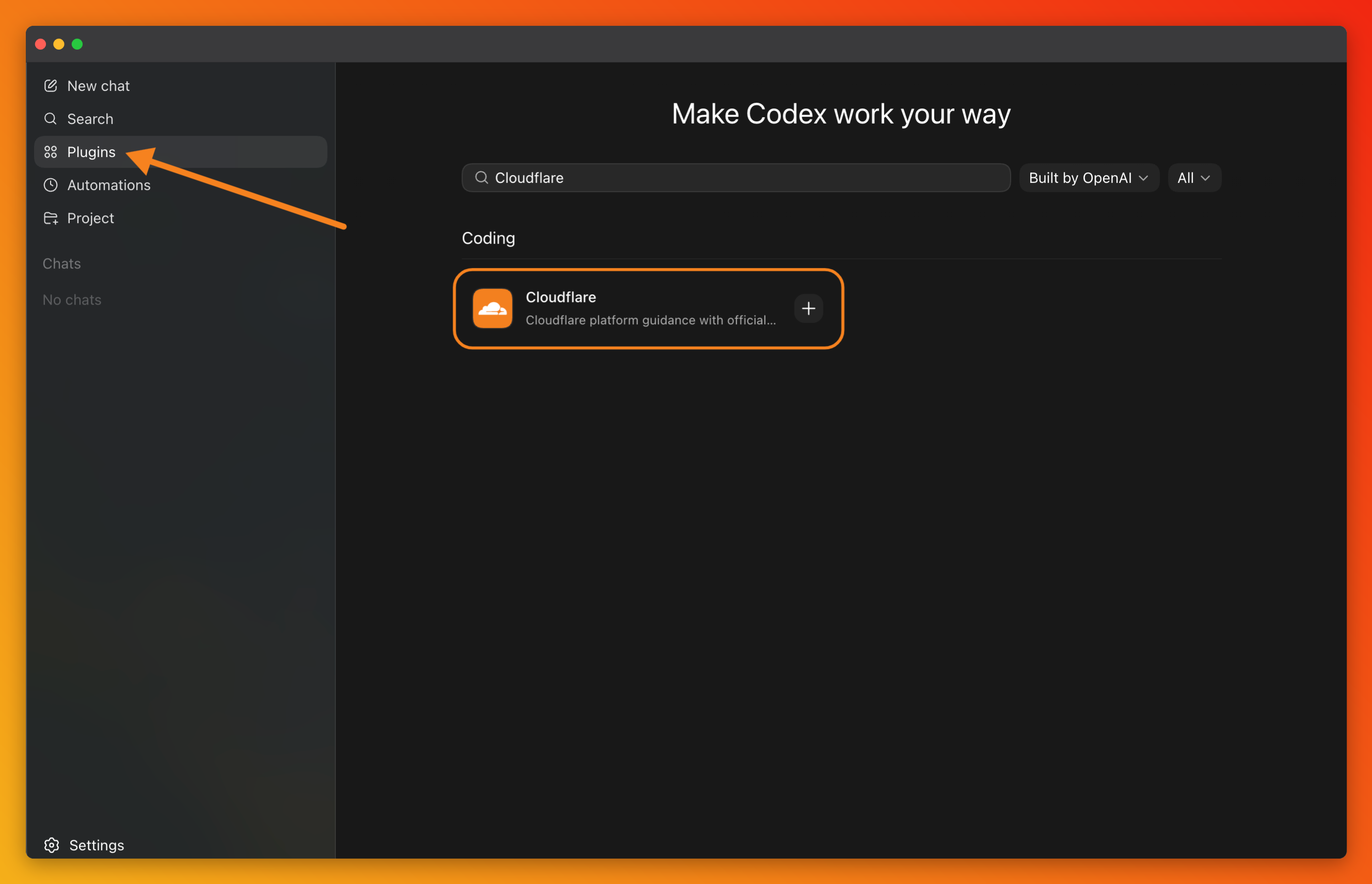
## Cloudflare platform access
Expand any section to learn more.
<details>
<summary>Cloudflare Skills
</summary>
Persistent platform context that teaches the agent how Cloudflare works.
Skills are instructions the agent loads on demand. The <a href="https://github.com/cloudflare/skills">cloudflare/skills</a> bundle covers every layer of the platform — so the agent knows your conventions without you re-explaining them.
- agents-sdkBuild, debug, or review Cloudflare Agents SDK applications using the agents package.
- basinBuild and troubleshoot Cloudflare Basin analytics workflows with Basin Pipelines, Basin Catalog, and Basin SQL. Use for streaming data into R2 Iceberg tables, managing catalogs, or querying those tables; also use for requests using the former Data Platform, Pipelines, R2 Data Catalog, or R2 SQL names.
- cf-cliCloudflare's official cf CLI (beta) for the public Cloudflare API and Workers projects. Use for finding and running Cloudflare commands from the terminal — sign-in and profiles, cf cli search, cf schema, cf deploy/dev/build, resource commands for DNS, zones, D1, KV, and R2 — and for choosing between cf and Wrangler in a project.
- cloudflareDiscover and choose Cloudflare products for apps, APIs, AI agents, storage, networking, and security. Use for architecture and product selection, including when the user describes a need without naming a Cloudflare product; then find the relevant skill or documentation.
- cloudflare-email-serviceImplement or troubleshoot Cloudflare Email Sending and Email Routing integrations and their delivery configuration.
- cloudflare-oneDesign, configure, troubleshoot, or review Cloudflare One Zero Trust and SASE deployments. Use cloudflare-one-migrations for migration planning from other vendors.
- cloudflare-one-migrationsAssess and plan migrations from existing VPN, SWG, or SASE platforms to Cloudflare One, including policy mapping, parity gaps, and rollout.
- durable-objectsBuild, debug, or review Cloudflare Durable Objects code for persistent state and coordination.
- gateway-workersBuild, debug, or review Cloudflare Workers invoked by the Forward action in Gateway HTTP policies, including the GatewayMiddleware entrypoint, Gateway types, context, and continuation.
- k2Build and troubleshoot Cloudflare K2 or K2 Streams durable logs. Use for stream setup, producing from Workers or HTTP, configuring retention and inputs, and consuming through subscriptions.
- nextjs-on-cloudflareBuild, migrate, and deploy Next.js apps on Cloudflare Workers with vinext. Use when starting a Next.js project on Cloudflare, moving an existing app to Workers, choosing between vinext and OpenNext, or setting up vinext for Workers. For setup, migration, or deployment, install vinext's upstream skills with \`npx skills add cloudflare/vinext\` if missing, then read and follow the applicable skill and docs.
- sandbox-migrate-to-nextMigrate Cloudflare Sandbox apps from stable @cloudflare/sandbox to @cloudflare/sandbox@next (SDK 1.0 preview). Use sandbox-next for apps already on the preview.
- sandbox-nextBuild or maintain Cloudflare Sandbox apps on @cloudflare/sandbox@next (SDK 1.0 preview). Use sandbox-migrate-to-next when porting a stable app.
- sandbox-stableBuild or maintain Cloudflare Sandbox apps on the stable @cloudflare/sandbox package. Use sandbox-next for preview apps and sandbox-migrate-to-next for stable-to-preview migrations.
- turnstile-spinSet up, repair, or migrate to Cloudflare Turnstile bot verification in an existing frontend and backend, including server-side Siteverify.
- web-perfAudit, diagnose, or optimize website loading and interaction performance, Core Web Vitals, and Lighthouse performance scores.
- workers-best-practicesCloudflare Workers best practices for production applications. Use when writing, reviewing, or configuring Workers.
- workers-profilingProfile or debug CPU usage and memory allocation in deployed Cloudflare Workers and Durable Objects. Then use this information to optimize your code.
- wranglerRun or troubleshoot Wrangler CLI commands in projects that have a wrangler.jsonc, wrangler.json, or wrangler.toml file, including local development, Previews, deployment, and resource management. For new projects and projects without a Wrangler configuration file, use the cf CLI instead.
</details>
<details>
<summary>MCP servers
</summary>
Live access to the Cloudflare API, docs, and observability.
MCP servers provide typed tools to call into Cloudflare at runtime. There are two options: <a href="https://blog.cloudflare.com/code-mode-mcp/">Code Mode</a> — a single server that covers the entire Cloudflare API (2,500+ endpoints in \~1,000 tokens) — or a set of focused, domain-specific servers hosted in the <a href="https://github.com/cloudflare/mcp-server-cloudflare">cloudflare/mcp-server-cloudflare</a> repo. The full catalog is also in the <a href="https://developers.cloudflare.com/agents/model-context-protocol/cloudflare/servers-for-cloudflare/">MCP servers for Cloudflare</a> docs.
- Cloudflare API MCP Servercode modeBest when you want broad access across Cloudflare's APIs through code executionhttps://mcp.cloudflare.com/mcp
- Code mode APIcode modeBroad access to the full Cloudflare API via code execution, with minimal token overheadhttps://mcp.cloudflare.com/mcp
- Browser Run serverFetch web pages, convert them to markdown and take screenshotshttps://browser.mcp.cloudflare.com/mcp
- Cloudflare Blog serverSearch and read posts from the Cloudflare Bloghttps://blog.mcp.cloudflare.com/mcp
- Cloudflare One CASB serverQuickly identify any security misconfigurations for SaaS applications to safeguard users & datahttps://casb.mcp.cloudflare.com/mcp
- Container serverSpin up a sandbox development environmenthttps://containers.mcp.cloudflare.com/mcp
- Demo Day serverDemonstrate a minimal Cloudflare MCP serverhttps://demo-day.mcp.cloudflare.com/mcp
- Digital Experience Monitoring serverGet quick insight on critical applications for your organizationhttps://dex.mcp.cloudflare.com/mcp
- Documentation serverGet up-to-date reference information on Cloudflarehttps://docs.mcp.cloudflare.com/mcp
</details>
<details>
<summary>Wrangler CLI
</summary>
Local dev, deploys, and Workers-specific commands.
Use <a href="https://developers.cloudflare.com/workers/wrangler/">Wrangler</a> for local development, deploys, and product-specific commands like <code>wrangler d1 migrations apply</code> or <code>wrangler tail</code>. The bundled **wrangler** Skill teaches the agent when to reach for it.
Cloudflare CLI (beta)
The <a href="https://developers.cloudflare.com/cf/">Cloudflare CLI</a>, <code>cf</code>, covers the public Cloudflare API and prints JSON output. Install it with <code>npm install -g cf</code>, then follow <a href="https://developers.cloudflare.com/cf/agents/">Use cf with AI agents</a>.
</details>
<details>
<summary>Agent-friendly docs
</summary>
Token-efficient references optimized for agents.
Append <code>/index.md</code> to any Cloudflare docs URL for a clean markdown version. Every top-level product section also has its own <code>llms.txt</code> — a page index sized for a single context window. A few useful ones:
- <a href="https://developers.cloudflare.com/llms.txt">developers.cloudflare.com/llms.txt</a> — directory of every Cloudflare product.
- <a href="https://developers.cloudflare.com/workers/llms.txt">developers.cloudflare.com/workers/llms.txt</a>
- <a href="https://developers.cloudflare.com/agents/llms.txt">developers.cloudflare.com/agents/llms.txt</a>
- <a href="https://developers.cloudflare.com/r2/llms.txt">developers.cloudflare.com/r2/llms.txt</a>
- <a href="https://developers.cloudflare.com/d1/llms.txt">developers.cloudflare.com/d1/llms.txt</a>
For a full overview of how these docs are structured for agents, refer to the <a href="https://developers.cloudflare.com/docs-for-agents/">Docs for Agents guide</a>.
</details>
## Example prompts
```txt
Connect my Worker to an existing Postgres database using Hyperdrive for connection pooling.

